
 中文
As the old Zhongke Cloud server has been in use for nearly 10 years and its performance and configuration can no longer keep up, Zhongke Measurement and Control has now enabled the latest cloud server, which has been connected to the TC-4850N wireless network vibrometer and the TC-6850 network vibrometer.
For users who previously used the TC-4850N network vibrometer, only the relevant configuration needs to be modified.
① Modify the IP address of the TC-4850N instrument:
Start -- Instrument Settings -- Network Parameters -- Network Connection
Change the remote host to: y1.cdzkck.cn
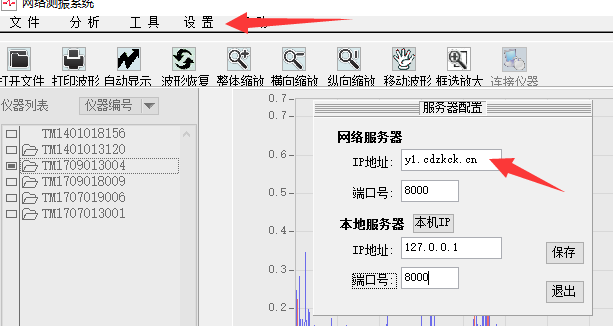
② Modify the IP address on the software side:
Double-click to open the PC software -- Settings -- Server Configuration
Change the network server IP address to: y1.cdzkck.cn
③ For the new PC software and the Zhongke Cloud platform, please go to:
(The modification method is similar; just change the IP to y1.cdzkck.cn)
Introduction to the Zhongke Cloud Monitoring Platform
